A community library for my coworking space
A mobile web app for the shared bookshelf at Z-Space. Any member or anyone visiting the space can browse the ~100 book community library, borrow and return on the honor system, and grow the collection by donating their own books. Screens 1. Browse (Home): Screen that helps you discover what’s available in the communi…
A mobile web app for the shared bookshelf at Z-Space. Any member or anyone visiting the space can browse the ~100 book community library, borrow and return on the honor system, and grow the collection by donating their own books.
Screens
- Browse (Home): Screen that helps you discover what’s available in the community library. It has an available/total counter and your avatar, a lime "Johnny's pick" hero card with a tilted cover, a scrollable horizontal "Recently added" cover rail, and finally the full catalog as genre bookshelves (spines on a shelf), switchable to grid or list via Tweaks.
Key decisions:
- The shelf metaphor is the default. Spines grouped by genre with a thick black shelf line mimic the real shelf in your space — browsing feels physical, not like a database.
- Availability is ambient, not loud. A small 82/100 on shelf counter and tiny "Out" badges on covers — you can see the state of the library at a glance without it dominating.
- One featured book, hand-picked. "Johnny's pick" instead of an algorithmic carousel, it's a 100-book community library, so curation should feel personal.
- Procedural covers. Each book gets a bold typographic cover in the Z-Space palette, so the catalog looks cohesive without needing cover-art uploads.
- Search: Screen that allows you to find a book in the library via search input (title/author, live), availability toggle (Everything / Available now / Out), scrollable genre chips.
Key decisions:
- Filters before typing. With only 100 books, most "searches" are really filters — "what design books are in right now?" is two taps, zero typing.
- "Available now" is a first-class filter. The most common real question at the shelf is "what can I actually take home today."
- Results are a list, not a grid — once you're searching, metadata (author, status, genre) matters more than visual browsing.
- Book Detail: Screen that gives details on one Book. It shows a large tilted cover, title, author, year, a status card, one big CTA (Borrow / Return / Checked out), genre/pages/year meta strip, a History timeline showing who has it now, everyone who has read it, and who initially donated the book.
Key decisions:
- One CTA, state-dependent. Borrow if it's in, Return if you have it, disabled "Checked out" if someone else does. No reserve/hold queue — honor system, keep it simple
- Lightly social by design. You see who has the book and who has previously taken it out (so you can walk over and ask), but there's no messaging, nudging, or due-date shaming.
- The timeline is the book's biography. Newest → oldest: current holder ("Now" badge) → past readers → the donor with a pink "+" badge. It quietly celebrates contribution and gives books provenance — and replaced reviews, which you flagged as too complex.
- Add a Book (the FAB on the main screen): Screen that allows anyone to add a new book to the library. It shows an amber "Donate a book" banner, URL field (Goodreads/Bookshop), title, author, genre chips, "Add to library" button, a success screen ("On the shelf!") that tells you to physically drop the book off.
Key decisions:
- URL instead of photo upload, a link does the work of cover art and metadata without a camera flow.
- Can import details from link / goodreads if available
- Four fields, one screen, no wizard. Donating should take 30 seconds; the banner copy says exactly that.
- The success state bridges digital → physical: "Go drop it off at the library corner" closes the loop with the real shelf.
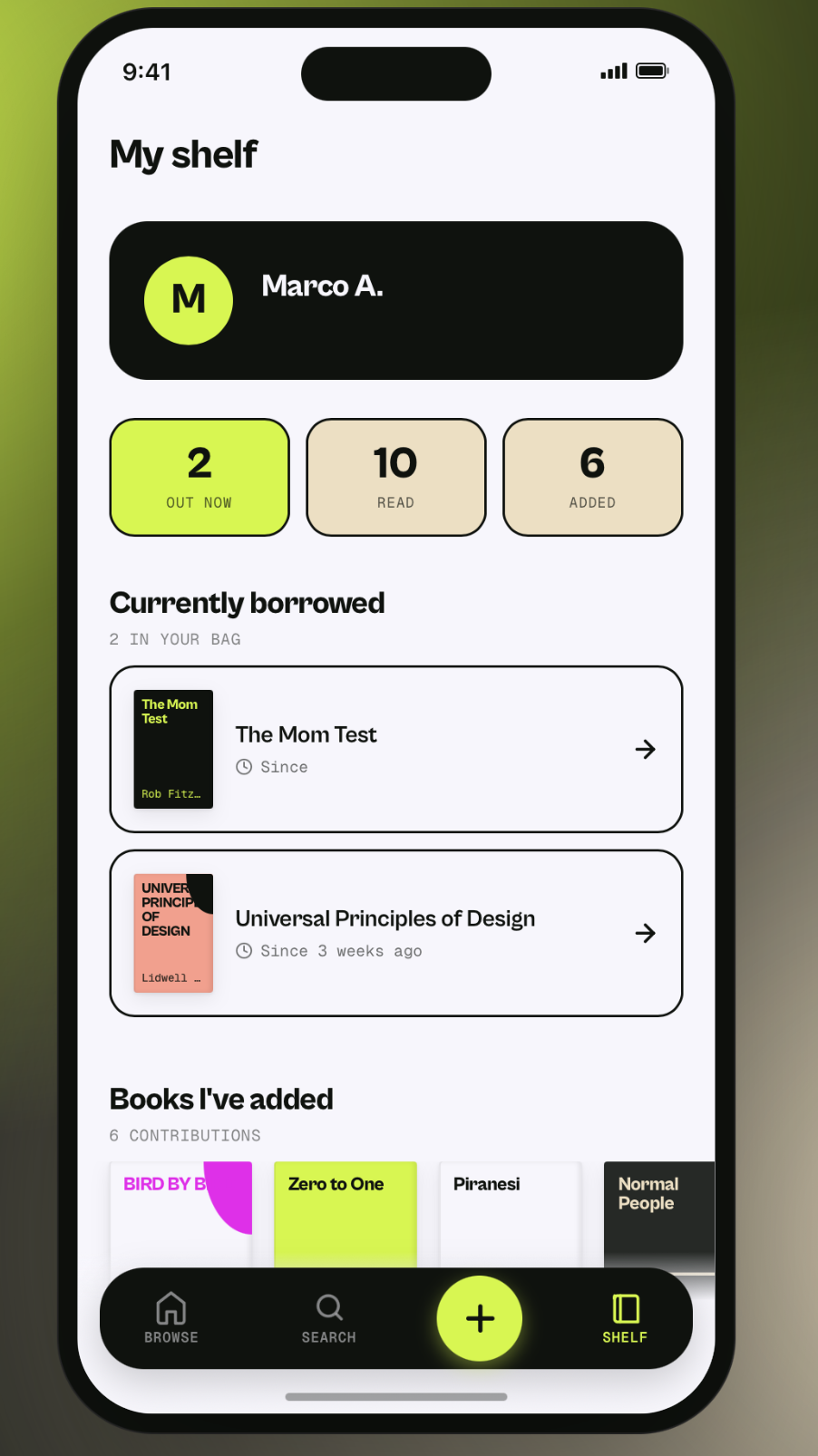
- My Shelf: Screen that shows what you have read / donated in the library. It shows a dark profile card (name, "member since") · three stat tiles (Out now / Read / Added) · "Currently borrowed" cards with how long you've had each book · a rail of books you've donated · "Previously read" history.
Key decisions:
- "Currently borrowed" is the top job. The honor system has no due dates, so a gentle "Since 3 weeks ago" timestamp is the only nudge to return things — visibility instead of enforcement.
- Contribution is a stat. "Added" sits beside "Read" — donating books is as celebrated as reading them.
- No streaks or gamification. Stats are a quiet record, not a leaderboard.
Remix this tool
Details
- tool category: relational_tech
-
Tool
Block Party Organizing
Plan and coordinate neighborhood block parties
-
Tool
Community Apps Dashboard
A directory of community-built digital tools and resources
-
Tool
Community Clubs Platform
Start and run clubs that gather in real life — created by the BuildIRL team in San Francisco
-
Tool
Community Income Sharing
Neighbors send a share of their monthly income directly to each other — a Baltimore-born club, concept by Alex Zhu
-
Tool
Footer Component
A remixable footer component for neighborhood websites
Relational Tech Studio library · RCL-1.0
Original source: https://ax0.taddy.org/antler/ZSpace-Library.html
See something to fix or add? Suggest an edit on GitHub — the commons lives in git too, and its history is the changelog.
relational-tech